Caitlin Lim — Year 2, Applied Science
Abstract
In a modern age of phone-based navigation, many pedestrians are in more danger than ever as they shift attention from their surroundings to the directions on their cell phone. This danger is enhanced for visually impaired users, who require all possible attention to navigate their environment safely. Navigation using senses such as audio has been explored, but it is ultimately not practical or socially pragmatic. Thus, the concept of haptic sensations in relation to information delivery is being explored. This protocol outlines the design, development, and testing methodology for a wearable haptic navigation system with easy integration aimed at assisting visually impaired individuals in outdoor navigation. The system uses motors within wristbands to vibrate, providing real-time directional cues based on Google Maps notifications. The protocol includes a series of trials evaluating the device’s accuracy, usability, and user comfort during short-, medium-, and long-distance journeys. The outcome of this study predicts the foundational development of a practical, hands-free, and accessible navigation system for visually impaired individuals.
Introduction
Navigation is defined as the process of planning and following a route to get from one direction to another (Howard, 2019). Navigation is strenuous, requiring various cognitive functions including mental imagery, planning, problem-solving, and decision making (Miola et al., 2024). Whether for work, play, or fulfilling basic needs, most people travel outside of their homes every day and must navigate their environment. During travel, people use navigation systems—commonly an electric system in a vehicle or mobile device providing a real-time map of their current location and turn-by-turn directions (PCMAG, n.d.)—to arrive at their destination. Often called a “GPS,” a navigation system receives signals from the GPS satellite system. Navigation systems are used in virtually every method of transportation, including walking and cycling, and their complexity has increased over the decades as smartphones and small computers have become more prominent (Ruginsky et al., 2022). Consequently, these navigation methods have limitations.
Most people rely on visual navigation through their cell phones, repeatedly looking down at the screen to follow directions. This requires the user to remove some attention from their surroundings to view the instructions on their phone screen, which can easily become dangerous, particularly in dynamic outdoor settings. Auditory navigation was introduced to resolve this issue; however, these are not commonly used as people tend to avoid using audio cues in public, and the use of headphones decreases awareness of important environmental sounds (Ertan et al., 1998). Furthermore, people with difficulty hearing or processing auditory information cannot effectively use audio-based navigation techniques. Overall, current visual and auditory methods of communication with navigation systems present safety concerns. These apprehensions, coupled with increasing attention to visually impaired navigators, have begun to be addressed by the development of multi-modal interaction with navigation systems.
Multi-modal interaction, referring to situations where users are provided with multiple modes for interacting with systems, offers a potential solution (Kuriakose, 2020). One promising version is haptic feedback, defined as taking advantage of the human sense of touch by applying forces, vibrations, and/or motions (Jacob et al., 2012). Recent technology has focused on haptic notifications as it reduces the cognitive load and allows for eyes-free navigation. Research supports this; for example, haptic notification systems have proven to outperform auditory cues in accuracy for distracted drivers (Ploch et al., 2017). These characteristics make haptics incredibly suitable for mobile and wearable systems.
However, haptic systems reveal several engineering design challenges. Early prototypes, including vibration-padded vests, demonstrate that while users could interpret directional patterns, they required bulky hardware and had low user interpretation accuracy rates (Ertan et al., 1998). Similarly, vibrating insoles specifying the North, South, East, and West directions reported high accuracy but required high levels of concentration, possibly leading to mental fatigue (Veláquez et al., 2015). When activated, the motors would produce vibrations against the user’s back, conveying predetermined vibration patterns to indicate instructions such as keep straight, move forward, etc. Users found the vibrations to be comfortable and easy to understand; however, challenges arose surrounding timing errors when the user incorrectly interpreted the signal, and the route was not corrected. Devices on the consumer market, such as the feelSafe belt, provide usable, accurate products but are expensive and inaccessible to most users. These products demonstrate that while haptic navigation is feasible, usability, comfort, and accessibility are among the core unresolved issues.
Device placement is another critical factor. Kappers et al. suggest that waist-based systems are effective for directional cues but may be impractical in everyday contexts, while foot-based systems are difficult to implement due to constant movement (Kappers et al., 2024). Hand and wrist-based systems are practical but often fail to be fully hands-free or rely on complex vibration patterns that require intense cognitive effort. Even widely available solutions, such as smartwatch navigation, including the Apple Watch, primarily act as prompts to check a screen rather than provide complete guidance. These limitations further demonstrate the importance of usability, low-additional-cognitive effort, and easy implementation into daily life in order for haptic navigation to be realistic.
There is a gap in simple, convenient, hands-free, wrist-based haptic technology—one that this project aims to address. There is a need for intuitive left/right directional cues, non-mentally exhausting communication methods, and unobtrusive designs. A good design will be easy to use, comfortable in long periods of time, and will be hardly noticeable in daily life. This navigational system will focus on usability, comfort, and real-world applications. This project aims to develop a proof-of-concept prototype of a hands-free haptic navigation system using wireless left and right vibrating wristbands to convey directional cues without reliance on visual or auditory feedback. It will be convenient and affordable through integration with cell phones, as the GPS and navigational cues will be provided by the Google Maps app, lessening the burden on the device itself. Such a system can provide the possibility of a device design that is an easily accessible and affordable alternative, in order to evaluate its possibility and potential in urban environments.
Materials and Methods
To tactically notify the user of incoming directions from their cell phone’s maps app, a device was created using a microcontroller module (ESP32-WROOM-32, Espressif Systems), two coin-type DC vibration motors (MarsPro Mini DC Vibration Motors), wires (DFRobot M/M Jumper Cables for Arduino), two breadboards, three elastic sport-sweat wristbands (8cm Cotton Blend, Hcbuu), and three AA batteries (Amazon Basic 1.5V Alkaline Batteries), complete with a 3xAA Battery Mount (TME Electronics, BH-331-3A COMF – Holder). An Android phone was used to control and test the device as well (Samsung S20). Most programming was written on an Apple MacBook Air. Software-wise, the Arduino IDE (C++) and Android Studio (Kotlin) were used.
Before any physical or digital construction, a system interaction diagram was constructed to understand how the elements would interact with the rest of the system. A visualization of the potential construction was also created.
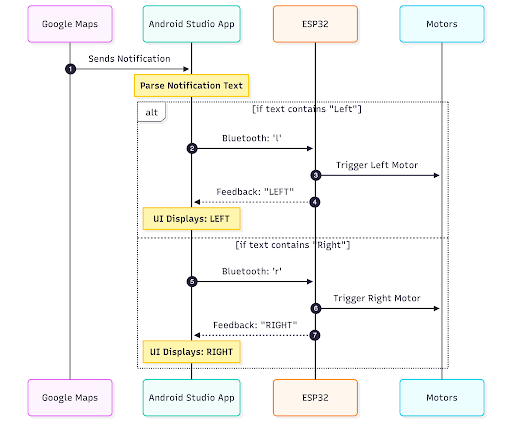
Figure 1: System Interaction Diagram
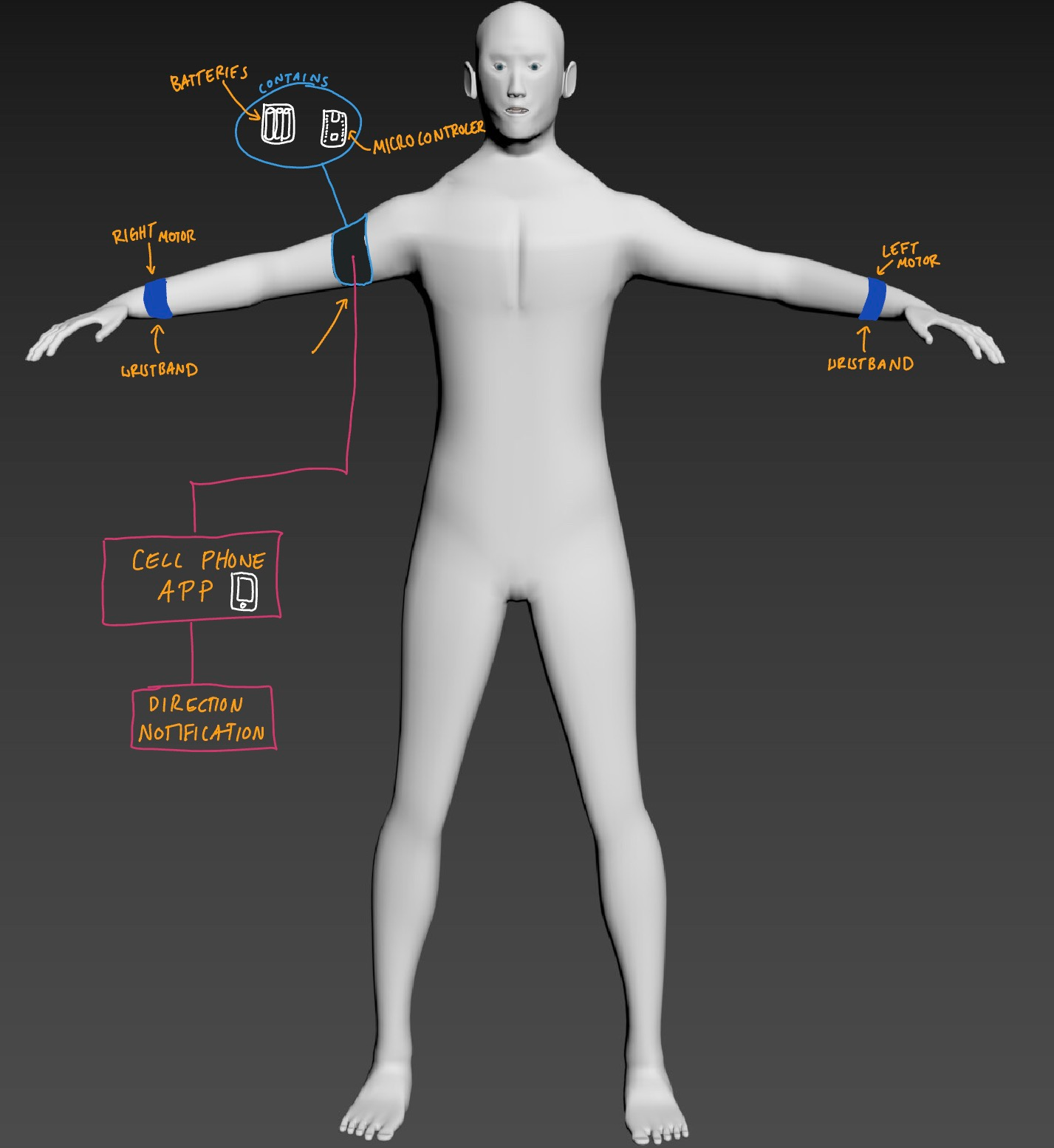
Figure 2: Device construction and rigging on model
Then, a schematic was drawn to understand the formation of the initial circuit for the coin motors before beginning physical construction.
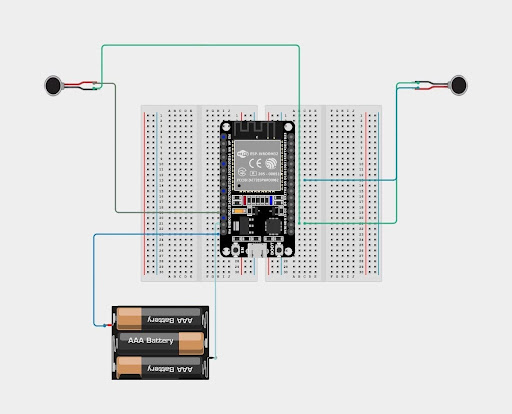
Figure 3: Circuit Diagram
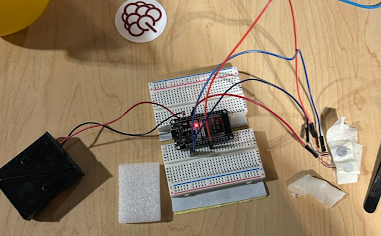
Figure 4: Early iteration of device prototype
Following a successful schematic, physical construction began. The microcontroller module was inserted into two breadboard sides. Each of the two motors was wired to separate pins on the board, with the left motor connected to pin GPIO12 and the right connected to GPIO18, respectively. After placing the batteries into the battery mount, it was connected to the module via the VN and GND pins.
The next requirement was to control the circuit. Written in C++ inside the Arduino IDE, the microcontroller module and the Android phone were linked via Bluetooth, referencing the procedure by Random Nerd Tutorials (citation). Code was written to control the ESP32 output using the Bluetooth terminal on the Android phone, allowing it to be controlled wirelessly—not directly connected to a computer. After initializing the serial Bluetooth function, each direction was assigned a pin number. Upon receiving a character from the phone, if the signal for the right was sent, then the corresponding pin would set off and vibrate the motor for 2000 milliseconds, and vice versa for the left. Multiple delay functions were present for motor stability.
To mount the device for the user, fabric elastic sport wristbands were used. Each motor was placed on the wrist underneath a loose wristband for security. The wires connecting the motors to the microcontroller module snakes its way up the user’s arms to where the breadboards are mounted onto another elastic fabric band high on the user’s arm (Figure 3).
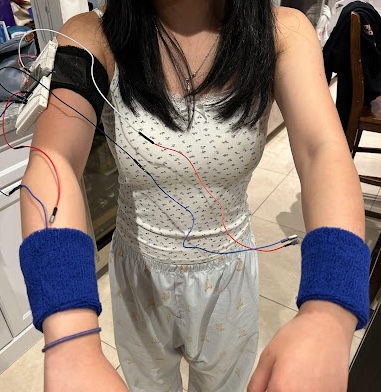
Figure 5: Rough device set up on subject
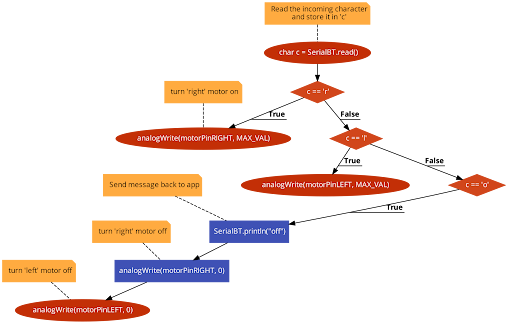
Figure 6: Device’s code flowchart
Controlling the device via reading Google Maps notifications was a strenuous process. The ESP32 recommends that you use the Serial Bluetooth Terminal app to control the module via Bluetooth. The published code for a simplified version of the app, Simple Bluetooth Terminal by Kai Morich (Appendix B), was modified to include a function that adds a button to begin the journey and start the notification reading function, and modifies the original Android manifest to allow the app its required permissions. Additionally, this app was combined with another app, Notification Forwarder by GitHub user ItsAnzi (Appendix C), to use the notification reader function to parse the Google Maps notification for “left” or “right” and send the corresponding signal via Bluetooth to the ESP32. Finally, Claude AI was used to debug and make over the UI interface (Appendix D). The combination of these modifications plus the original app allows it to be controlled wirelessly by the cell phone (without being plugged into a laptop, and for it to read, register, and react to Google Maps notifications in real time.
Protocol and Procedure
The experiment will consist of two separate testing phases. During the first phase, an experiment will be conducted to test the accuracy and feasibility of the device—how well a user could navigate to a predetermined location, depending entirely on the device. The first testing phase will collect data on and calculate the accuracy of the device: whether it will notify the user of the correct direction. Multiple trials will be done for short-distance journeys.
The second phase is focused on the user experience, evaluating the feasibility of developing the device as a commercial product. It will collect data on the user experience, measuring the ease of use, comfort, and perceived user success.
Preliminary Setup
During all testing phases, a healthy adult with poor eyesight (requiring glasses to participate in daily activities) will be used as the participant, without using optical aids; they will be recruited through outreach efforts. The subject will be properly fitted with the device and fully aware of the testing procedure. The developed Android application will be downloaded onto the subject’s cell phone, and the phone will be connected to the device via Bluetooth, with the connection verified by the manual trigger. The Google Maps app will be used to simulate real-world navigation scenarios. The subject will navigate from their house to nearby locations as determined by the trial phase. Only one subject will be used for a first proof-of-concept prototype; in the future, multiple subjects will be used.
Trial Phase 1: Accuracy
The first journey will be a short trip (~100 metres) to a nearby elementary school, while the second will be slightly longer to a neighbour’s house (~300 metres). The third and final trip will be the furthest, ending at a nearby grocery store (~500 metres). The accuracy percentage, along with the time between the notification on the phone and the physical buzz, will be measured for each trial (Table 1).
Table 1: Accuracy and delay measured in multiple short-distance journeys (Note: This table is a template for data collection)

Trial Phase 2: Usability
The subject, using the device, will be navigating outdoors in the Marpole-Oakridge neighbourhood. The device will be properly attached as referenced in Figure 3, and uniform starting and ending destinations, along with routes, will be chosen for different trials. Each trial will have the subject set and confirm the destination before not viewing the cell phone for the entirety of the trip, depending entirely on the tactile directions.
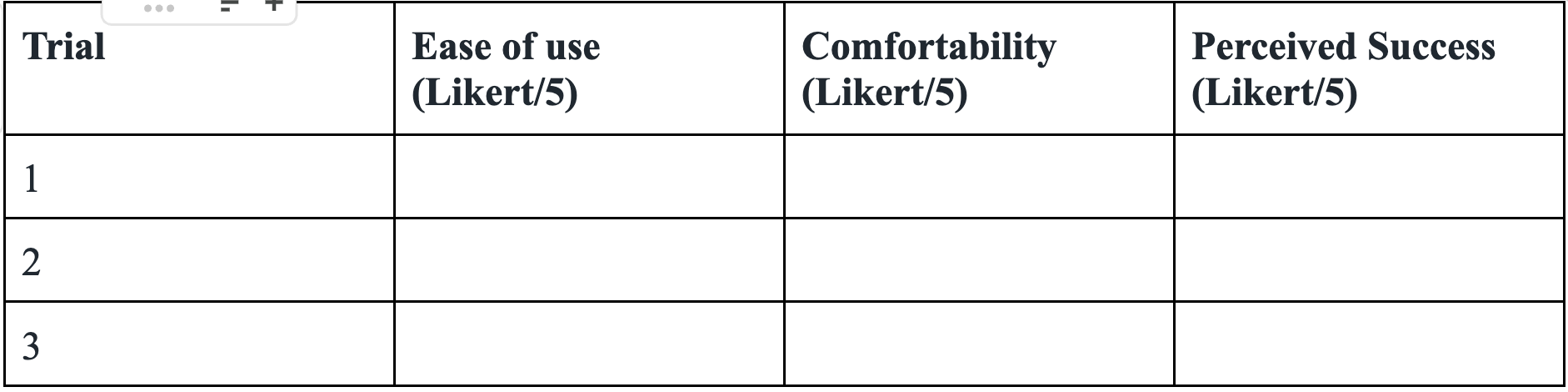
Multiple Likert scales will be used to judge the user’s experience in order to determine the realistic usability of the product (Table 2). Ease of use will be measured by how much setup and active usage were required, comfort will be measured by the physical device on the body, and perceived success will be a measurement of how well the user believed the device performed on the journey as a navigational guide. A 1 is considered the most negative option, while a 5 is the most positive.
Table 2: Trait ratings of the device (Note: This table is a template for data collection)
Data Analysis
Trial Phase 1: Accuracy
For the quantitative data collected in this phase, multiple statistical analyses will be performed. The average accuracy will be attained by calculating the mean percentage accuracy across all three trials (the average percentage of correct notifications). The standard deviation will then be calculated to quantify the variability in accuracy across experimental trials. A small standard variation will indicate consistency, while a large one will indicate the opposite. Similar calculations will be conducted for the delay between digital and tactical notifications, taking the mean and standard deviation to assess the average delay across all trials and how much variability there is–these numbers will indicate the overall accuracy of the experiment.
Trial Phase 2: Usability
This phase collects more qualitative data. A questionnaire will be created to gain data for the following categories: Ease of Use, Comfortability, and Perceived Success—all measured using Likert scales from zero to five. To get a better understanding of the user experience, each category can be analyzed separately to see if the average of all subjects per category approaches five.
Anticipated Results
The general hypothesis is that the prototype, in its current fashion, will report high accuracy rates (<90%), minimal delay (<1 second), and mid-level usability scores. It is anticipated that participants will rate the system as easy to use and successful, but not comfortable to use due to the wristbands being wired to a base unit. It’s hypothesized that the device will prove effective in providing an alternate navigation aid for individuals with visual impairments; however, in its current state, it will prove to be more effective when used alongside viewing digital notifications on the cell phone.
Discussion
This protocol discussed a structured approach to develop and test a wearable haptic navigation system to fit visually impaired individuals. Alternate methods of navigation, including auditory, have been explored, alongside other haptic navigation experiments; however, most developed prototypes are not usable in general lifestyles, creating the need for a haptic-based device. By evaluating the device’s accuracy, usability, and user comfort, the study aims to shed light on the feasibility and effectiveness of haptic technology in general, everyday navigation scenarios.
Despite any potential findings, the protocol is far from without limitations. Past an initial proof of concept for the design proposal, we would expect each wristband motor to be wireless, and the controlling unit to be small enough to fit in a pocket. Its current user Likert ratings reflect its archaic construction; furthermore, using more test subjects would give a better reflection of how the public would receive the device. Additionally, the device requires a custom-built app and can only run on Android-based cell phones, limiting the user market significantly. This study can only suggest a prototype for future iterations, offering a brighter future in haptic navigation.
A significant confounding variable in this study is whether it can be accurate for users navigating unfamiliar environments. The nature of the experiment had the sole subject follow directions for a location they were already familiar with, possibly causing the subject to pre-emptively expect the notification before the vibration. This can impact the objectivity of recorded success, as it cannot be decisively claimed that the subject arrived at the correct location because of the device. Other factors include data viability in different areas of the city (strength of signal), increased physical exertion from constant tactile stimulation, and a subject’s familiarity with vibrations near the wrist (e.g. Apple Watch users).
For future studies, it is expected to further develop the physical and digital properties of the device. For instance, eliminating the bulkiness of the breadboards and long, easily broken wires can improve the user experience significantly. Another field that could be explored is the location of the motor, and if any particular body part is the best, or worst, for receiving tactical signals that are not easily ignorable. A large, tenuous aspect is the method of obtaining devices. In theory, syncing it with Google Maps or other previously installed navigation applications might be more convenient for adopting users, but it could contribute to delays in instructions and inaccuracies in directions. Finally, with more time in the short term, a feature could be added where small, intermittent vibrations notify the user of upcoming turns instead of one shocking jolt at the intersection.
References
Definition of navigation system. (n.d.). PCMAG. https://www.pcmag.com/encyclopedia/term/navigation-system
Ertan, S., Lee, C., Willets, A., Tan, H., & Pentland, A. (1998, October 1). A wearable haptic navigation guidance system. IEEE Xplore. https://doi.org/10.1109/ISWC.1998.729547
Fleck, J. J., Zook, Z. A., Clark, J. P., Preston, D. J., Lipomi, D. J., Pacchierotti, C., & O’Malley, M. K. (2025). Wearable multi-sensory haptic devices. Nature Reviews Bioengineering, 3. https://doi.org/10.1038/s44222-025-00274-w
Howard, J. L. (2019). Navigation | technology. In Encyclopædia Britannica. https://www.britannica.com/technology/navigation-technology
Instructables. (2024, May 29). Haptic Feedback As an Innovative Navigation System. Instructables. https://www.instructables.com/Haptic-Feedback-As-an-Innovative-Navigation-System/
Jacob, R., Winstanley, A., Togher, N., Roche, R., & Mooney, P. (2012). Pedestrian navigation using the sense of touch. Computers, Environment and Urban Systems, 36(6), 513–525. https://doi.org/10.1016/j.compenvurbsys.2012.10.001
Kappers, A. M. L., Holt, R. J., Junggeburth, T. J. W., Fa, M., J.T, B., & Plaisier, M. A. (2024). Hands-Free Haptic Navigation Devices for Actual Walking. IEEE Transactions on Haptics, 17(4), 1–18. https://doi.org/10.1109/toh.2024.3405551
Kuriakose, B., Shrestha, R., & Sandnes, F. E. (2020). Multimodal Navigation Systems for Users with Visual Impairments—A Review and Analysis. Multimodal Technologies and Interaction, 4(4), 73. https://doi.org/10.3390/mti4040073
Miola, L., Muffato, V., Sella, E., Meneghetti, C., & Pazzaglia, F. (2024). GPS use and navigation ability: A systematic review and meta-analysis. Journal of Environmental Psychology, 99, 102417. https://doi.org/10.1016/j.jenvp.2024.102417
Ploch, C. J., Bae, J. H., Ploch, C. C., Ju, W., & Cutkosky, M. R. (2017, June 1). Comparing haptic and audio navigation cues on the road for distracted drivers with a skin stretch steering wheel. IEEE Xplore. https://doi.org/10.1109/WHC.2017.7989943
Ruginski, I., Giudice, N., Creem-Regehr, S., & Ishikawa, T. (2022). Designing mobile spatial navigation systems from the user’s perspective: an interdisciplinary review. Spatial Cognition & Computation, 22, 1–29. https://doi.org/10.1080/13875868.2022.2053382
Santos, S., & Santos, R. (2019, May 10). ESP32 Bluetooth Classic with Arduino IDE – Getting Started | Random Nerd Tutorials. RANDOM NERD TUTORIALS. https://randomnerdtutorials.com/esp32-bluetooth-classic-arduino-ide/
Velázquez, R., Pissaloux, E., & Lay-Ekuakille, A. (2015). Tactile-Foot Stimulation Can Assist the Navigation of People with Visual Impairment. Applied Bionics and Biomechanics, 2015, 1–9. https://doi.org/10.1155/2015/798748
Appendix
Appendix A:
Code uploaded directly to the microcontroller module
Appendix B:
https://github.com/kai-morich/SimpleBluetoothTerminal
Appendix C: